The OpenCart search module built for speed
NitroSearch replaces OpenCart’s built-in search with instant, typo-tolerant results served by a dedicated engine — so search stops running on your hosting and starts selling for you. One extension, live in minutes, on OpenCart 3 and OpenCart 4 alike.
Free up to 100 search results · No card required · EU-hosted
Works with
OpenCart 3.0.x and 4.0–4.1 — both current majors, one module
Install
Upload one archive in your back office — Extensions → Installer
Free tier
Up to 100 search results, no card, no time limit
From install to instant in minutes
No template overrides, no theme surgery, no developer required — the module finds your search box and takes it from there.
Upload the extension
One archive, uploaded under Extensions → Installer, then installed from Extensions → Modules. It syncs your catalogue to your own EU-hosted search index and keeps it in sync from then on.
Press Connect
The Configure screen confirms you control the domain, then starts the first sync on its own. Nothing about your products changes.
Shoppers feel it immediately
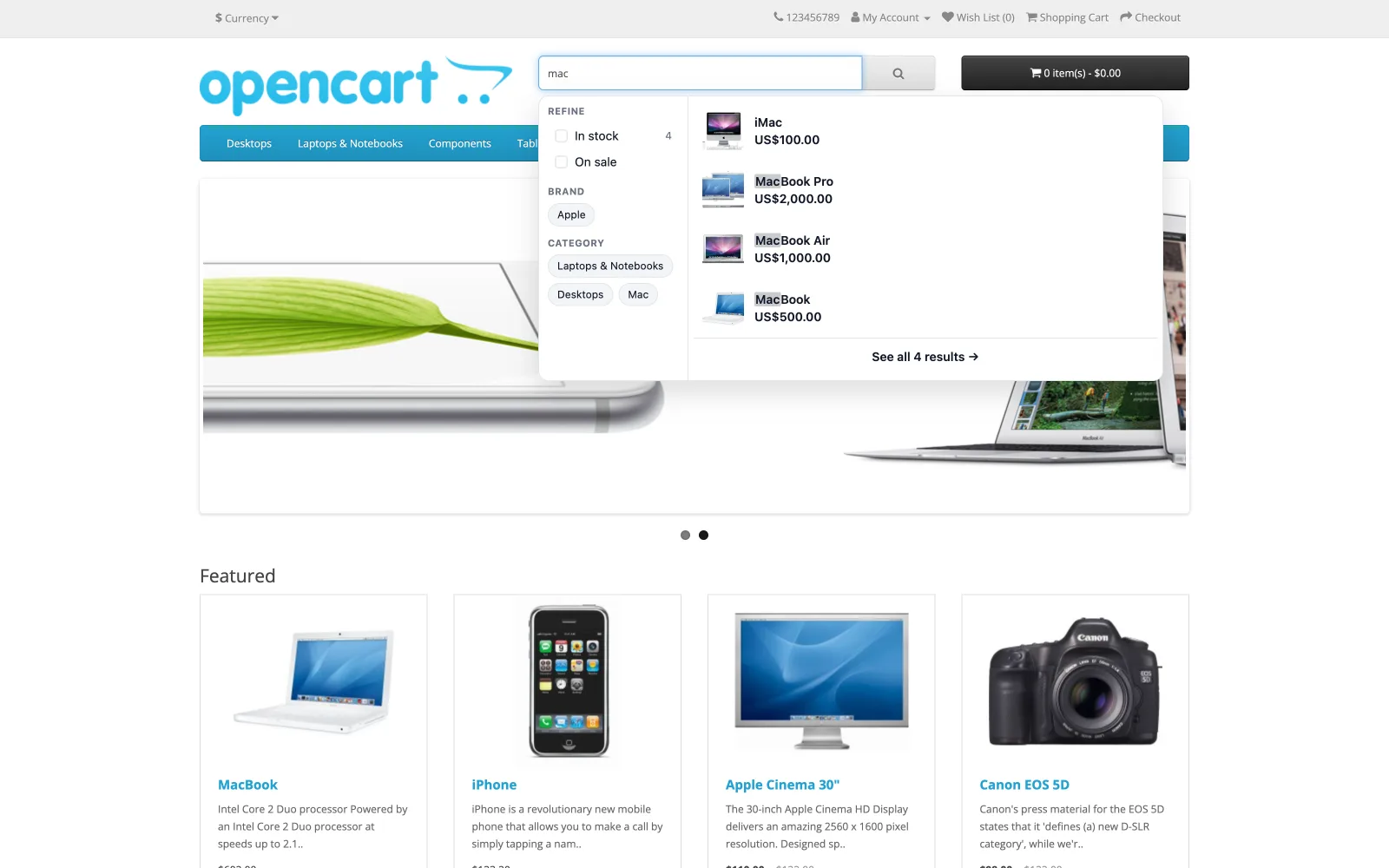
Results appear as they type, with filters and add-to-cart — on your theme’s existing search box, with no template to edit and nothing to place in a layout.
Not just the dropdown
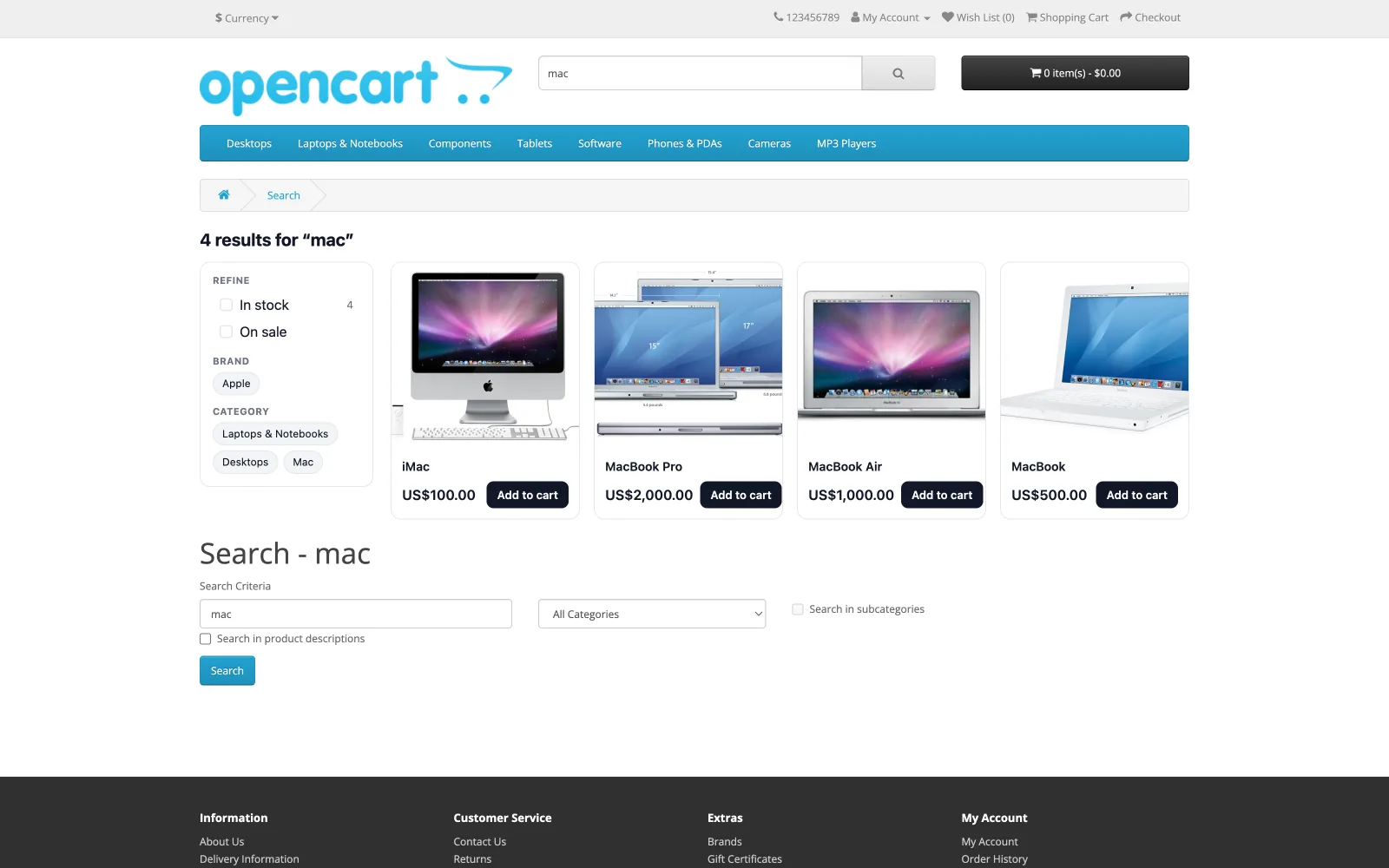
The results page comes with it — the same index, the same filters, the same add-to-cart, on your own search URL.
Everything a shopper would type
All of it on every plan — search is never tiered. The one paid-plan extra is search analytics, and we say so plainly.
Names & descriptions
Typo-tolerantly, as the shopper types — so “hummingbrid” still finds the hummingbird t-shirt.
Models, SKUs & manufacturers
Product models and SKUs are searchable, and so is the manufacturer name a shopper is likely to type first.
Stock, special, brand, category
Filters your shoppers can actually use, built from your own catalogue rather than configured by hand.
Variants, folded in
On OpenCart 4 a variant is its own product row. One product stays one result however many variants it has, rather than filling the page with near-duplicates.
Popularity, wherever it lives
OpenCart 3 counts views in a column and OpenCart 4 in a table. The module reads whichever your shop has, so ranking works on both.
Nothing on your server
Every query goes from the browser straight to our engine. Your hosting is never in the search path.
OpenCart search, in depth
What the platform actually does, read out of its own source — and what to do about it.
Before you install
Is NitroSearch free for OpenCart?
Yes — free up to 100 search results, for as long as you like, no card required. Download the archive for your OpenCart version, upload it in your back office, press Connect, and search is upgraded in minutes. Paid plans start at $5.99/mo and are priced by catalogue size only — never per search.
Does it work with OpenCart 3 or only OpenCart 4?
Both, and that is deliberate rather than generous. OpenCart 3.0.5.0 was released in December 2025, eight months after 4.1.0.3, so neither line is legacy. The two majors are not compatible with each other — a controller’s directory, class name and namespace all differ — so there are two archives built from one shared codebase, and you download the one for your version.
How do I install it?
OpenCart has no central extension directory, so you download the archive from our releases page and upload it under Extensions → Installer. Then install the module itself from Extensions → Modules — on OpenCart 4 that second step is required, not optional, because OpenCart does not register an extension until a module of it is installed. Open Configure, press Connect, and the first sync starts on its own.
Will a search extension slow my shop down?
Ours won’t. Every search travels from the shopper’s browser straight to our EU-hosted engine, so your server is never in the search path and search adds no load to your hosting. Sending your catalogue to us happens in small batches in the background, and never during a checkout.
Do I need to set up a cron job?
It is worth doing and it is not required. OpenCart has no background worker on either major, so pointing your host’s scheduler at the address on the Configure screen is what keeps changes arriving within minutes. Without one, the module does a little sending after a page has already been shown to a shopper, so nobody ever waits for it; a quiet shop syncs when someone visits it.
What does it actually search?
Product names, descriptions, models, SKUs, manufacturers and categories — typo-tolerantly, as the shopper types. On OpenCart 4, variant rows fold into their parent product so one product stays one result. Filters for stock, specials, brand and category are built from your own catalogue.
Does it work with my theme?
It enhances the search box your theme already has and renders inside its own shadow DOM, so theme styles and the widget cannot interfere with each other. There is no template to edit and nothing to place in a layout. On your shop’s own search page the results grid is replaced with ours, on the same URL, with your theme’s heading and refine form left in place.
Does it support multi-store or several currencies?
Not yet. The module indexes one catalogue, in your shop’s configured language and default currency, against the default store’s settings — OpenCart’s multi-store storefronts are not indexed separately. It is written on the Configure screen rather than left for you to discover.
Is the module translated?
Not yet. The module’s own back-office screens are in English today. The storefront search panel is a separate thing and already speaks nine languages on WooCommerce; those translations have not reached the OpenCart module yet.
OpenCart behaviour on this page last checked against live OpenCart 4.1.0.3 and 3.0.5.0 installs on 2026-08-05.
Give your shoppers search that finds things
Free up to 100 search results, no card, no time limit. Paid plans start at $5.99/mo and are priced by catalogue size — never per search.