Magento Search That Forgives A Typo
Magento already ships a real search engine — so this is not the “your search is a slow database scan” story, and we will not tell it. What NitroSearch adds is relevance you do not have to build, on an engine you do not have to run: typo tolerance, filters from your own attributes, and a results page served straight from a cloud-hosted index. Magento Open Source 2.4, Luma and Hyvä alike.
Free up to 100 search results · No card required · Cloud-hosted

Works with
Magento Open Source 2.4.6–2.4.9, on Luma, Hyvä or a custom theme
Install
One Composer command — no marketplace account, no listing fee
Free tier
Up to 100 search results, no card, no time limit
From Install To Instant In Minutes
No template overrides, no theme surgery, no developer required — the module finds your search box and takes it from there.
Composer Require
One command, then the usual enable, upgrade and compile. Distribution is Composer and GitHub — deliberately, not the Adobe Commerce Marketplace, which is why there is no reviewer queue and no listing fee between you and an install.
Press Connect
Stores → Configuration → Services → NitroSearch. Choose the store view to index, press Connect, and the first sync starts on its own — including the change-detection triggers, which are installed for you.
Shoppers Feel It Immediately
Results appear as they type, on the search box your theme already has. Nothing to place in a layout, no template to edit, and the same one module serves Luma and Hyvä.
Not Just The Dropdown
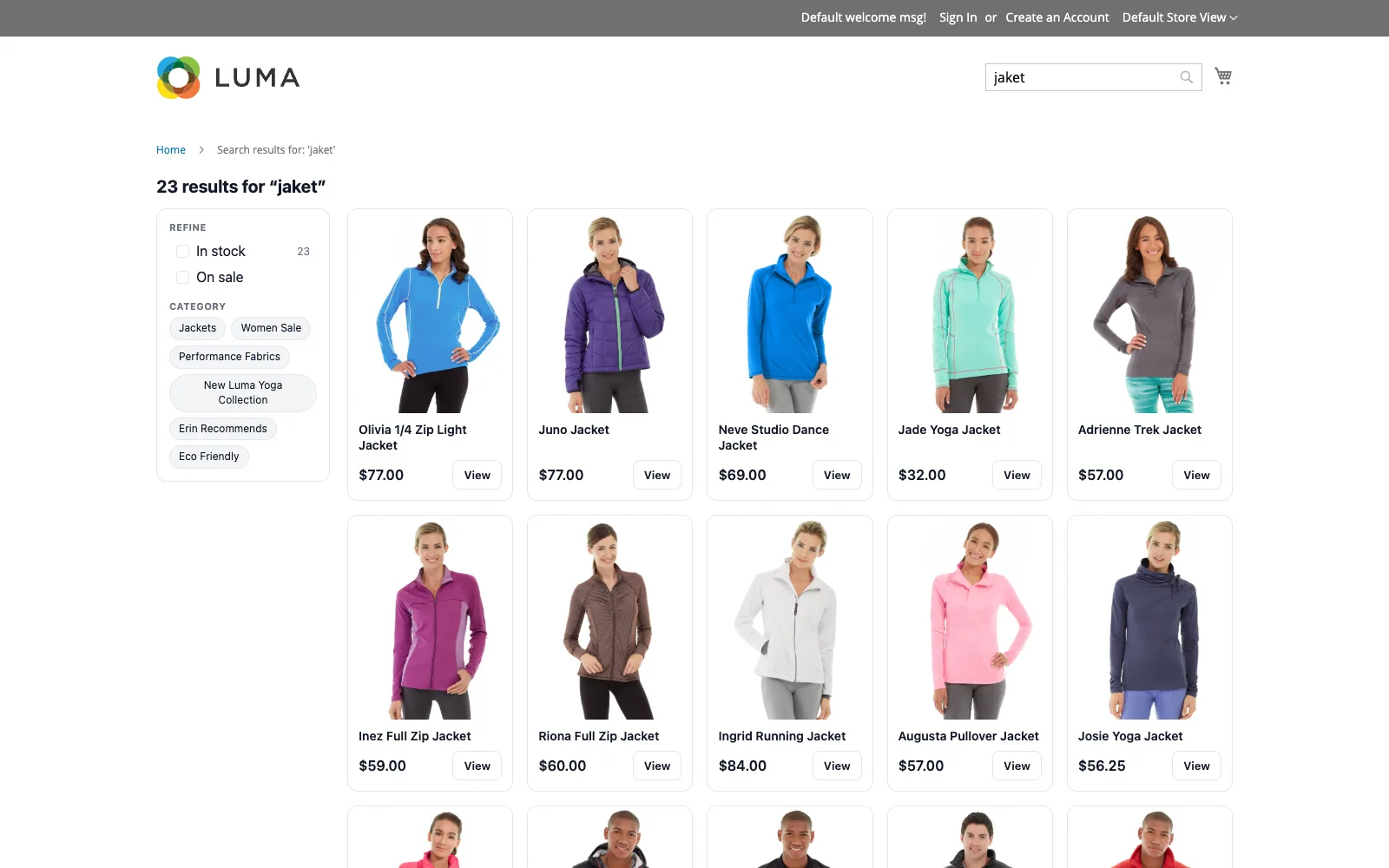
The results page comes with it — the same index, the same filters, the same add-to-cart, on your own search URL.
Everything A Shopper Would Type
All of it on every plan — search is never tiered. The one paid-plan extra is search analytics.
Names, Descriptions & SKUs
Typo-tolerantly, as the shopper types — including every variation’s SKU, so someone who has a variant code from an invoice finds the product it belongs to.
Your Own Filterable Attributes
The attributes you ticked “Use in Layered Navigation” become search filters — colour, size, material, whatever your catalogue uses. We keep no list of our own, so adding an attribute in Magento adds it to search.
Prices From The Price Index
Special prices, catalog price rules and tier prices are already resolved there, so what a shopper sees in search is the number your product page shows — including “From” prices on bundles.
Configurables, Folded In
One configurable stays one result however many variations it has, with every child’s SKU, price, stock and option values folded in. Your catalogue does not fill the page with near-duplicates.
Units Sold, From Your Own Reports
Ranking uses Magento’s own bestseller figures, so it agrees with the numbers in your admin rather than inventing a popularity of its own.
No Cluster Of Your Own
Every query goes from the browser straight to our cloud-hosted engine. Nothing to size, patch, monitor or pay a hosting bill for.
Magento Search, In Depth
What the platform actually does, read out of its own source — and what to do about it.
Before You Install
Is NitroSearch free for Magento?
Yes — free up to 100 search results, for as long as you like, no card required. Paid plans start at $5.99/mo and are priced by catalogue size only, never per search.
Magento already uses OpenSearch. Why would I need this?
Because running a search engine and having good search are different problems. Magento 2.4 requires OpenSearch or Elasticsearch, so you are already paying to size, patch and monitor a cluster — and out of the box it still returns nothing for a misspelling. We measured it: on a stock 2.4.8 install with sample data, searching “jaket” returns “Your search returned no results”, while “jacket” returns the jackets. NitroSearch returns twenty-three for both, and there is no cluster of yours in the path.
How do I install it?
One Composer command — `composer require nitrosearch/magento2-search` — then the usual `module:enable`, `setup:upgrade`, `setup:di:compile` and `cache:flush`. Distribution is Composer and GitHub rather than the Adobe Commerce Marketplace, so there is no reviewer queue between a release and your install. Then open Stores → Configuration → Services → NitroSearch and press Connect.
Does it work with Adobe Commerce?
Magento Open Source only. Adobe Commerce and Commerce Cloud are out of scope — we have not tested against them and will not claim support we cannot stand behind.
Does it work with Hyvä?
Yes, and the same single module serves both. Luma and Hyvä name their search box identically, so one layout file covers both themes — we verified it on one install running Luma on the default store view and Hyvä on a second one, including add-to-cart from the results grid.
Will a search extension slow my store down?
Ours won’t. Every search travels from the shopper’s browser straight to our cloud-hosted engine, so neither your PHP workers nor your search cluster are in the path. Sending your catalogue to us happens in small batches on your existing cron, and never during a checkout.
How does it know when a product changes?
Through Magento’s own change tracking, not a “product was saved” event. That matters more on Magento than anywhere else: catalog price rules applying from cron, tier prices written by mass tooling, stock moving because of pending orders and `bin/magento import` all change what a shopper should see without anyone saving a product. A save-hook extension does not break on those — it quietly drifts, which is worse.
Does it support multiple store views or websites?
One store view per connection today. Magento’s scope hierarchy is real and we would rather index one store view correctly than several badly — the Connect screen makes you choose which, and states the limit on the page rather than after you install.
Is the extension translated?
Not yet. The module’s own back-office screens are in English today. The storefront search panel is a separate thing and already speaks 22 languages on WooCommerce; those translations have not reached the Magento module yet.
Will it show me which searches led to sales?
Yes. On every paid plan you get searches, click-through rate, add-to-cart rate, latency, the zero-result list, and search-attributed revenue — an order traced back to the search that started it. We proved that one through a real guest checkout, with a discount running and an unrelated item in the same basket, before we published the module.
What happens to my full page cache?
Nothing you have to think about, with one setting worth checking. Pages carrying our configuration are tagged, so when your storefront search key is renewed only those pages re-render — we never flush your whole cache. If you run Varnish, Magento sends cache purges only to the hosts listed in `http_cache_hosts`; `bin/magento nitrosearch:status` tells you whether yours is set, because the failure is otherwise silent.
Magento behaviour on this page last checked against a live Magento Open Source 2.4.8 install with Luma sample data on 2026-08-09.
Give Your Shoppers Search That Finds Things
Free up to 100 search results, no card, no time limit. Paid plans start at $5.99/mo and are priced by catalogue size — never per search.