Instant AJAX Search For WooCommerce
AJAX search, live search, instant search, autocomplete — different names for one promise: products appear while the shopper is still typing, with no page reload. The catch nobody mentions: where those results come from decides whether it feels instant or takes your server down.
2AJAX, Live, Instant, Autocomplete — A Translation Table
Four labels, one family of features. If you’re comparing plugins, here’s what each term actually promises:
| The term | What it means | What the shopper sees |
|---|---|---|
| AJAX search | Results fetched in the background, no page reload | A dropdown appears under the search box |
| Live / instant search | The AJAX request fires on every keystroke | Results update while they type |
| Autocomplete | Strictly: suggesting query terms | A list of words to click before searching |
| Product-first instant search | Real products returned per keystroke | Images, names and prices — no intermediate step |
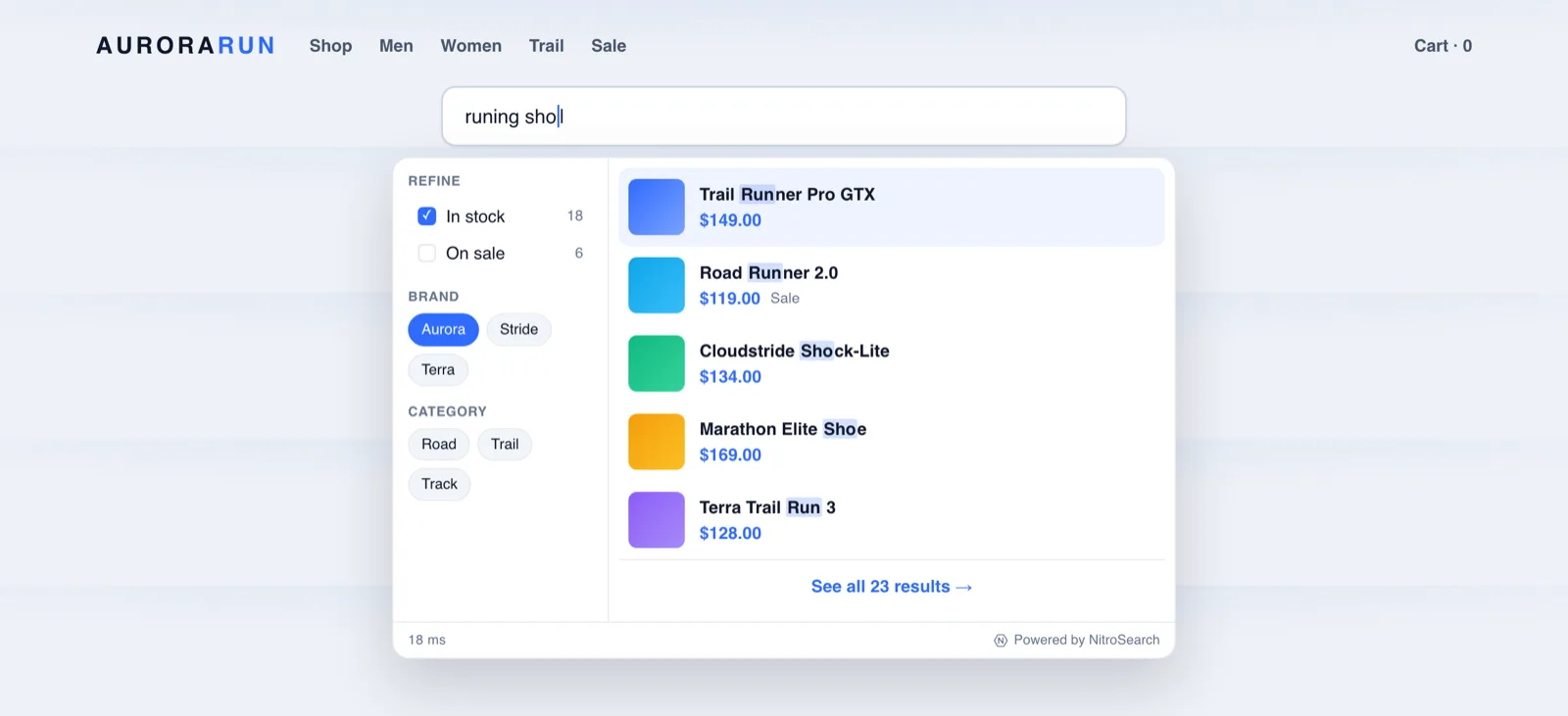
NitroSearch is the last kind: shoppers see actual products — image, price, sale badge, stock — not a list of guessed words to click first. A shopper who can see the product two keystrokes in doesn’t need a suggestion of what to type.
2What Separates Great Instant Search From A Laggy Dropdown
Instant search is easy to demo and hard to do well. The details that decide how it feels:
- Where the results come from. The defining choice. If each keystroke becomes a PHP request and a database query on your hosting, “instant” lasts until the first busy afternoon. NitroSearch answers every keystroke from a dedicated cloud-hosted engine, straight from the shopper’s browser — your server is never in the search path.
- Stale results must never flash. Type “red hoo…” quickly and the response for “red h” may arrive after the response for “red hoo”. The widget cancels superseded requests so results never flicker backwards — a tiny detail you feel instantly when it’s missing.
- Show why it matched. Matched terms are highlighted in the results, so shoppers trust what they’re seeing — especially when typo tolerance quietly rescued their spelling.
- Keyboard and screen-reader friendly. The dropdown is a proper accessible combobox: arrow keys traverse results, Enter opens, Escape closes, and assistive tech announces it correctly. Shoppers who never touch the mouse get the same speed.
- Remember where they left off. Recent searches reappear on focus (stored only in the shopper’s own browser — nothing tracked server-side), so returning shoppers resume in one tap.
Press Enter, Keep The Speed
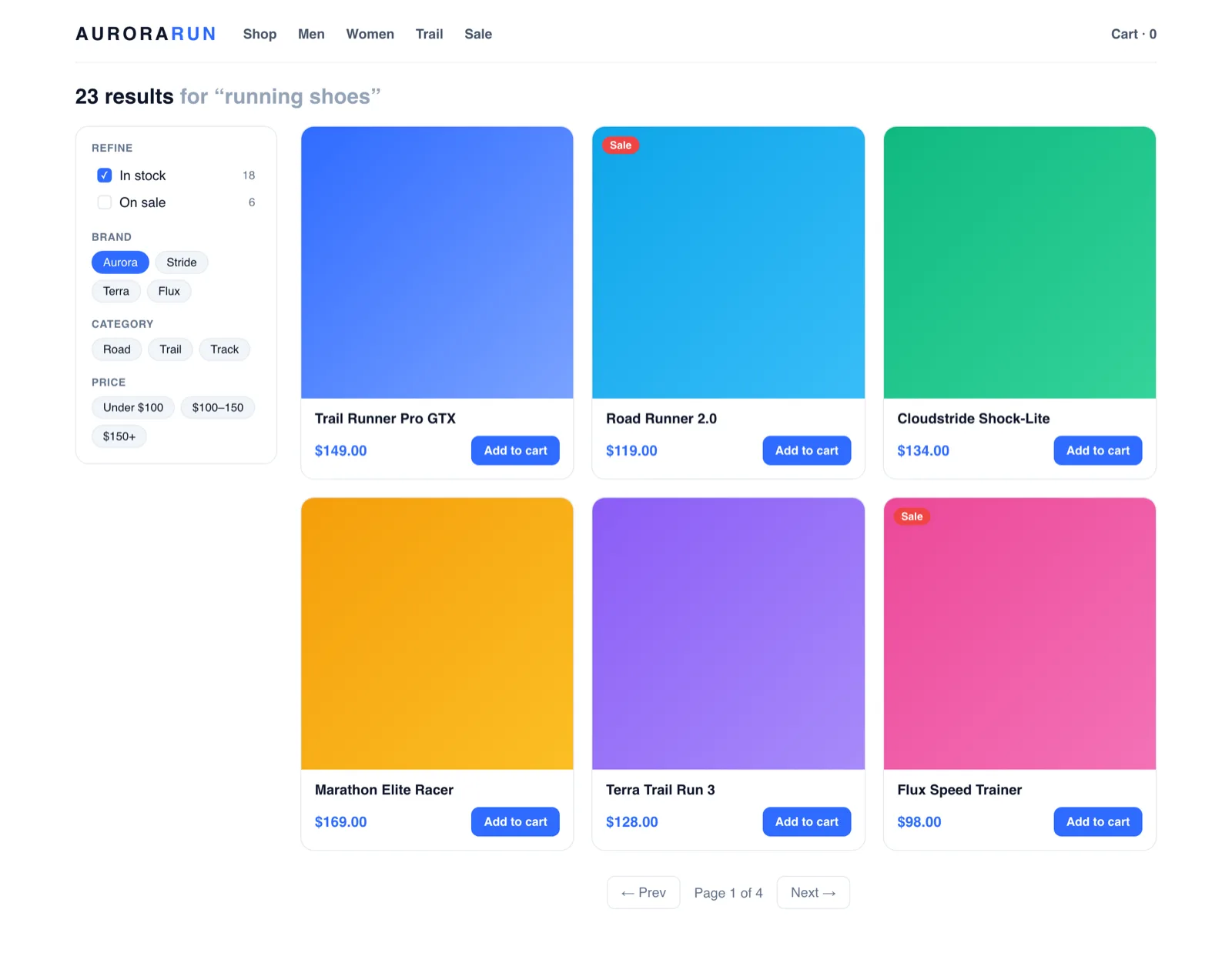
Most instant-search plugins stop at the dropdown. The full results page is where serious browsing happens — so it’s served by the same engine.
- A complete product grid on your theme’s own search URL
- Filters for category, brand, in-stock and on-sale — with live counts
- Pagination and add-to-cart, straight from the results
- Same engine, same speed as the dropdown — typically around a tenth of a second
More on the filter side of that page: faceted search for WooCommerce.
Looks Native To Your Store, Because You Tuned It
The widget seals itself in a shadow DOM so your theme’s CSS and the dropdown can never break each other — and the Design tab makes it yours without code.
Layout
Roomy, compact, big pictures or text-only — plus how many results the dropdown shows.
Scheme
Light, dark, automatic with the shopper’s system, or your own custom colours.
Shape & Type
Rounded, soft or square corners; your store’s font by default, or any stack you choose.
Feather-Light
About a tenth the weight of the usual search toolkit, loaded only when the shopper shows search intent.
Frequently asked
What is AJAX search in WooCommerce?
Is AJAX search the same as instant search, live search and autocomplete?
Doesn’t search-on-every-keystroke hammer the server?
Will the search dropdown clash with my theme?
What happens when a shopper presses Enter?
More on WooCommerce search
WooCommerce behaviour and product capabilities described on this page last checked 1 August 2026.
Give Shoppers Answers Mid-Keystroke
Instant AJAX search with zero load on your server — free up to 100 search results, live in minutes.
Free up to 100 search results · No card required · Cancel anytime