WooCommerce Search Not Working? Let’s Fix It
When a product you know exists returns no results, the cause is almost always one of a short list: catalogue visibility, product status, stock settings, a theme search form that isn’t scoped to products — or a term (like a SKU) that native search simply never looks at. Work through them in order.
2The 60-Second Diagnosis
Search “not working” is nearly always one of six causes. Check them in this order — each takes under a minute, and the first four need no plugins at all.
31. The Product Isn’t Actually Searchable
Open the product in the editor and check two things in the Publish/Visibility panel:
- Status — drafts, pending and private products never appear in search, for anyone who isn’t logged in as staff.
- Catalogue visibility — WooCommerce has a per-product setting with four options. “Shop only” and “Hidden” both remove the product from search results on purpose. It’s the single most common “missing product” cause, and it looks exactly like a broken search.
32. Out-Of-Stock Products Are Being Hidden
Under WooCommerce → Settings → Products → Inventory, the option “Hide out of stock items from the catalogue” silently removes every out-of-stock product from search. If your missing product is out of stock, this is your answer — and it’s a merchandising decision worth making deliberately: a findable “back soon” product can hold a sale a blank result loses.
33. The Search Box Isn’t Scoped To Products
A generic WordPress search form searches every post type — posts, pages, products, all mixed. Some themes render a product search form; many render the generic one. If searches return blog posts above products (or instead of them), your form is missing the product scope (the post_type=product parameter). Check your theme’s header/search settings, or test by adding &post_type=product to a search URL by hand.
34. You’re Searching Something WooCommerce Never Looks At
Native search scans titles, descriptions and excerpts — and nothing else. SKUs, brands, attribute values and custom fields all live in places the query never touches. A shopper pasting the SKU from a spec sheet gets nothing, however correct it is. That’s not a bug you can toggle off; it’s how SKU search fails by design.
35. A Plugin Or Theme Is Interfering
Search filters are a favourite hook for plugins — membership, multilingual, custom catalogues and other search plugins all rewrite the search query, and two of them rewriting it at once ends badly. The standard test: switch to a default theme and disable plugins, then re-enable in halves until search breaks again. Tedious, but it isolates the culprit in a few rounds.
36. Search “Works” — The Results Are Just Bad
If products technically appear but the right ones don’t, that’s not a settings problem. Native search matches literal substrings — one typo and there’s no match at all — and orders what it finds with almost no notion of relevance, so the best match can sit below a dozen accidental ones. No checkbox fixes that; it needs an engine that ranks. Start with typo-tolerant search and the improvement guide.
What NitroSearch Fixes — And What It Respects
A dedicated index sidesteps the fragile parts of native search, without overriding the choices you’ve made on purpose.
3Fixed For Good
- SKUs searchable — parent and variation SKUs indexed as standard
- Brands and categories match in the same keystroke as names
- Typos still find the product — closest match ranks first
- Products first: no blog posts burying your catalogue
- Results while they type, typically in around a tenth of a second
3Respected On Purpose
- Drafts and private products stay out of results
- “Shop only” and “Hidden” catalogue visibility are honoured
- Your out-of-stock preference carries over
- Pages and posts are included only if you switch them on
If a product is hidden, it stays hidden — that part was working as intended.
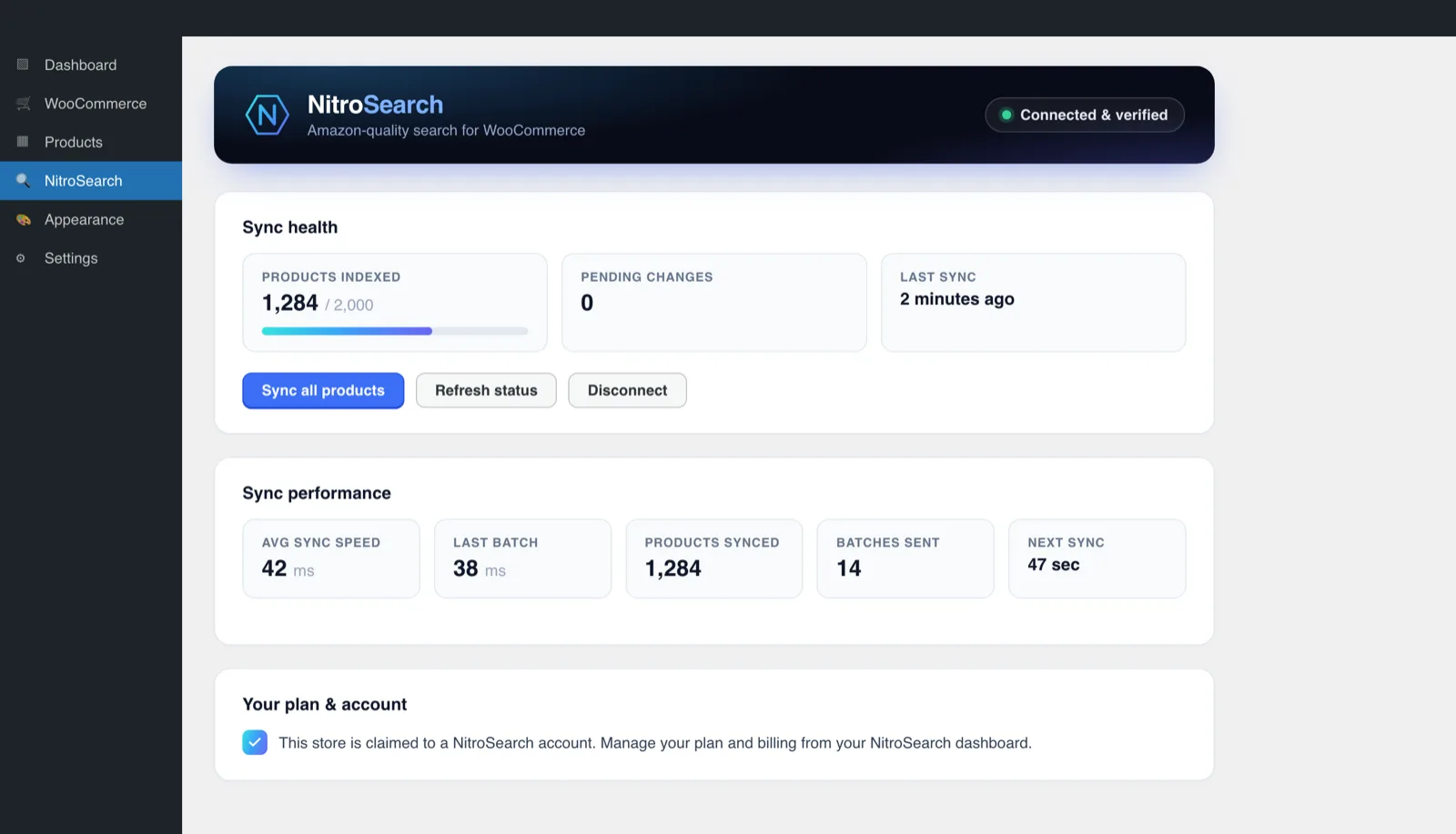
2“Is It Even Connected?” — Answered On One Screen
Half the pain of a broken search is not knowing which layer broke. The NitroSearch admin screen shows connection status, what’s synced, and live sync health in one place — so “is the index up to date?” is a glance, not an investigation. Every product change is queued in the plugin’s own outbox and retried until the engine confirms it landed.
Frequently asked
Why does WooCommerce search return nothing when the product exists?
Why can’t customers find products by SKU?
Why does my theme’s search box show posts instead of products?
Search works but the results are bad — is that the same problem?
Will NitroSearch fix these without me changing settings?
More on WooCommerce search
WooCommerce behaviour and product capabilities described on this page last checked 1 August 2026.
Or Skip The Whack-A-Mole Entirely
NitroSearch indexes names, SKUs, brands and categories, respects your visibility settings, and shows you it’s in sync — free up to 100 search results.
Free up to 100 search results · No card required · Cancel anytime