Why Is WooCommerce Search So Slow?
Because every search runs a wildcard scan across your whole products table — on the same server that’s rendering pages and processing checkouts. That’s an architecture problem, not a hosting problem, and it has an architectural fix.
2The Short Answer
WooCommerce search is slow because every query runs a leading-wildcard LIKE '%term%' scan over your wp_posts table (and often wp_postmeta too) — a query MySQL can’t index, on the same server that’s rendering pages and processing orders. It gets slower as your catalogue grows, and no cache can help, because every new search term is a query your database has never seen. The fix that lasts is architectural: serve search from a dedicated index instead of your database.
2What Actually Happens When A Shopper Searches
Type “hoodie” into a standard WooCommerce search box and WordPress builds a query that looks, in essence, like this:
SELECT * FROM wp_posts
WHERE post_type = 'product'
  AND post_status = 'publish'
  AND (post_title LIKE '%hoodie%'
   OR  post_excerpt LIKE '%hoodie%'
   OR  post_content LIKE '%hoodie%')
Three properties of that query decide everything about how search feels on your store:
- The leading wildcard defeats indexing. A database index can jump straight to entries that start with “hoodie”, but
'%hoodie%'asks for the term anywhere in the text — so MySQL has no shortcut and examines the product rows one by one. More products, more rows, more time. Every time. - It runs on your one server. The same PHP workers and database serving product pages, carts and checkout also serve every search. On a busy day — the day search matters most — search and checkout queue behind each other.
- Plugins multiply the work. The moment you bolt on SKU or attribute searching the query grows
JOINs intowp_postmeta— a table that holds dozens of rows per product and can reach millions of rows on a store with variations. The scan gets heavier exactly where the table is biggest.
And there’s a second cost hiding in “live search” plugins that stay on your server: search-as-you-type turns one search into a request per keystroke. Each of those is a fresh PHP boot and a fresh scan. Stores genuinely get slower after installing search plugins that promise the opposite.
2Why The Usual Fixes Don’t Hold
Each of these is regularly recommended, and each helps less than it promises:
- Bigger hosting. A faster server scans the same tables a little faster. You’ve paid for margin, not for a different query — and the margin erodes as the catalogue grows.
- Caching plugins. Page caches serve repeat views of the same URL, and mostly skip search URLs entirely. Search is the opposite case: every term is new. “runing shoes” has never been cached, and never will be.
- Database cleanup. Removing revisions and orphaned meta trims the tables being scanned — worth doing for general health, but it shaves the scan; it doesn’t change its shape.
- Search plugins that rebuild the index inside WordPress. The honest middle ground: a proper index table beats a
LIKEscan. But the index still lives in your database, the queries are still PHP on your hosting, and search-as-you-type still lands every keystroke on your server.
2The Fix That Actually Changes The Shape
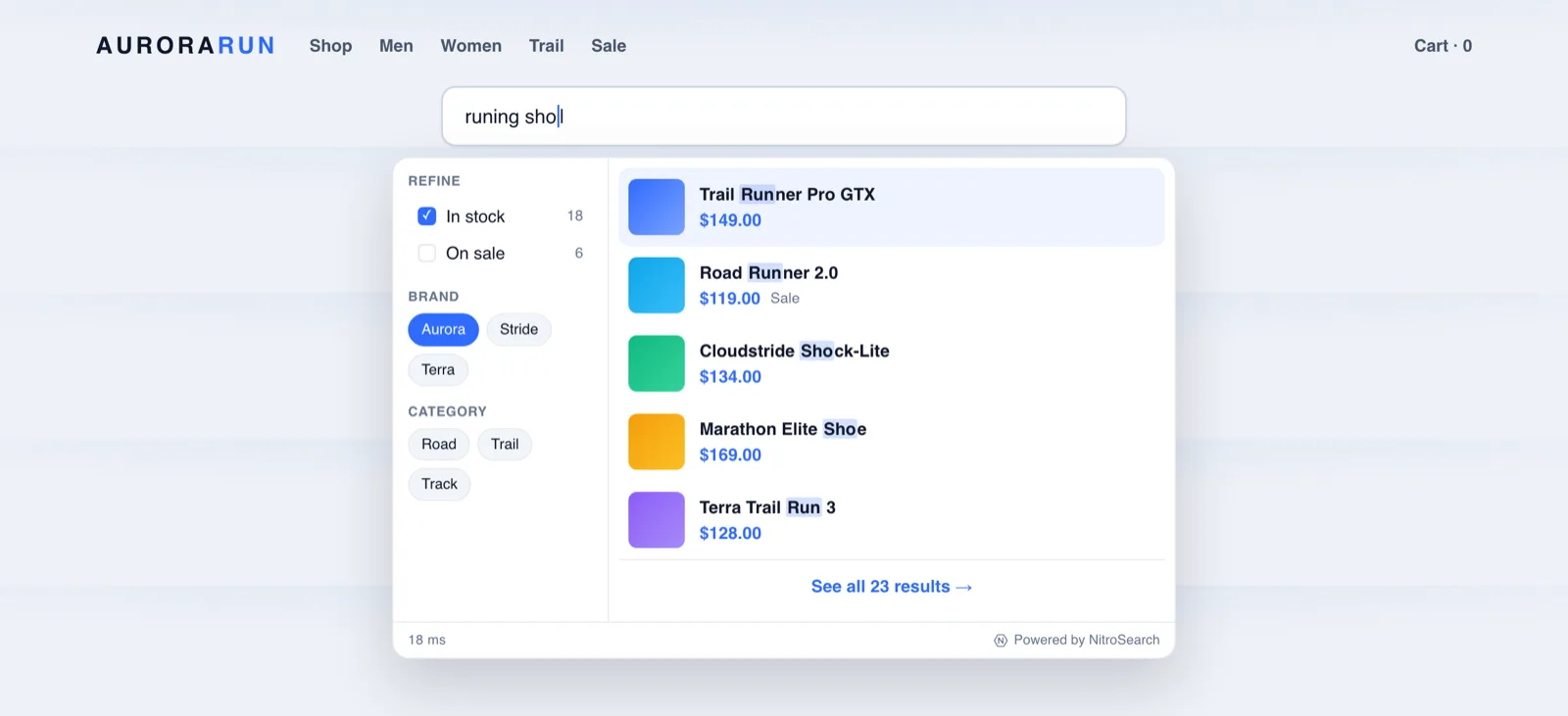
Fast search everywhere else on the web — the big marketplaces, the stores you wish yours felt like — is built the same way: search runs on a search engine, not on the shop’s database. The catalogue is copied into an index built for exactly one job, and the shopper’s browser talks to that index directly.
That single change fixes all three properties at once:
- The query shape changes — a purpose-built index answers “hoodie” without scanning anything, typo-tolerantly, ranked by relevance. Typically in around a tenth of a second.
- Your server leaves the search path entirely — searches add zero load to your hosting, however busy the day, however many keystrokes.
- Growth stops hurting — the index is built for catalogue-scale search in a way a general-purpose database scan never will be.
Search Moved Off Your Server, Properly
The plugin keeps your catalogue synced to a cloud-hosted index and upgrades the search box your theme already has. What that means in practice:
Browser → Engine
Every keystroke goes straight from the shopper’s browser to the engine. No PHP in the search hot path — your hosting does none of the work.
Sync You Can Verify
The plugin queues every product change in its own outbox and retries until the engine confirms it — with a live “in sync” screen in your admin.
Typos Stop Costing Sales
“Runing shoes” finds running shoes. Names, SKUs, brands and categories all match as they type, closest match first.
The Whole Results Page
Filters for category, brand, stock and sale status, pagination and add-to-cart — served fast on your theme’s own search URL.
Curious how deep the instant-search rabbit hole goes? See AJAX search done properly and typo-tolerant search — or if search is returning nothing at all, start with search not working.
Frequently asked
Why is my WooCommerce product search so slow?
Will upgrading my hosting fix slow search?
Do caching plugins speed up WooCommerce search?
What’s the fastest way to make WooCommerce search instant?
More on WooCommerce search
WooCommerce behaviour and product capabilities described on this page last checked 1 August 2026.
Make Search The Fastest Thing On Your Store
Move search off your server in minutes — instant, typo-tolerant, and free up to 100 search results.
Free up to 100 search results · No card required · Cancel anytime